PBX Trunk Sizing Guide: Traffic Analysis to Provisioning
A complete walkthrough of PBX trunk sizing: collecting traffic data, calculating Erlangs, running Erlang B, selecting your GoS target, and provisioning the right number of lines.
> **Quick Answer:** PBX trunk sizing follows four steps: (1) collect 30+ days of CDR data, (2) find your busy hour and calculate traffic intensity in Erlangs, (3) run Erlang B at your Grade of Service target, (4) add a growth buffer and provision. This guide covers each step in detail.
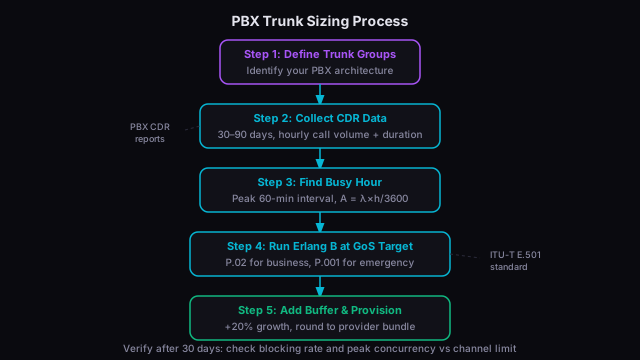
Getting trunk sizing right means your users never hear a busy signal and you're not paying for circuits you don't need. Both problems are common — under-provisioning leads to blocked calls and frustrated users; over-provisioning wastes money on lines sitting idle 90% of the time.
Here's the complete process.
Step 1: Define Your Trunk Group Architecture
Before collecting data, understand how your PBX is organized:
**Single site, single trunk group:** All external calls (inbound and outbound) share one pool of trunks. Simplest to plan — all traffic goes into one Erlang calculation.
**Multiple trunk groups by direction:** Separate groups for inbound and outbound, or separate groups for local, long-distance, and toll-free inbound. Each group needs its own traffic analysis and Erlang calculation.
**Multi-site with centralized trunking:** A hub-and-spoke model where one main site holds all trunks and branches use the IP WAN for external calls. Plan the central trunk group for all traffic across all sites.
**Hunt groups and DDI ranges:** Even if you have multiple DDI (Direct Dial Inward) number ranges, they usually share the same physical trunk pool. Plan the pool, not the DDI ranges.
For most SMB PBX deployments, you have a single SIP trunk group handling all calls. That's what this guide covers.
Step 2: Collect Traffic Data
You need at least 30 days of call data, ideally 90 days to catch seasonal patterns.
From Your PBX
Nearly every modern PBX has a CDR (Call Detail Record) export. Access the management interface and look for:
- **Cisco Call Manager / CUCM:** CAR (CDR Analysis and Reporting) tool. Generate a "Top N by Duration" or summary traffic report by hour.
- **Avaya Communication Manager:** CMS (Call Management System) reports. The "Trunk Group" report in historical reporting mode.
- **FreePBX / Asterisk:** CDR reports in the admin panel, or query the MySQL CDR database directly.
- **Microsoft Teams Phone:** Call Quality Dashboard and Teams admin center usage reports.
- **3CX:** Call Reports in the management console.
Export a CSV with call start time and duration for each external call. You'll aggregate this yourself.
What to Measure
For each hourly interval across your measurement period, you need:
- Total calls (in + out, or separate if different trunk groups)
- Total call-seconds (sum of duration in seconds for all calls in that hour)
- Average call duration = total call-seconds / total calls
Traffic intensity for that hour = total call-seconds / 3600
Step 3: Find the Busy Hour
Sort your hourly traffic intensities from highest to lowest. Your busy hour is the interval with the highest value.
For trunk sizing, the **time-consistent busy hour** is most useful: the clock-hour that consistently shows the highest traffic across many days. If 10–11 AM shows the highest traffic on 22 out of 30 measurement days, that's your time-consistent busy hour.
Use the 10 AM hour's average traffic across all 30 days — not the single highest observed value (which might be an unusual spike) and not the overall average (which undersells your real peak).
**Typical busy hours by industry:**
- General office: 10–11 AM (Monday–Tuesday highest)
- Retail: 11 AM–1 PM, also 6–7 PM
- Healthcare: 9–10 AM (Monday and after holidays spike)
- Financial services: 9–11 AM
- Education: Variable; admin offices peak at start of semester
Step 4: Calculate Traffic Intensity
**A = (Calls per hour × Average call duration in seconds) / 3600**
**Example:**
- Busy hour: 340 calls
- Average call duration: 195 seconds
- A = (340 × 195) / 3600 = **18.4 Erlangs**
This is your offered traffic. If you're already experiencing blocking (callers complain of busy signals), your measured call volume is your **carried** traffic, not offered. Add 2–5% to estimate offered traffic when blocking is already occurring.
Step 5: Select Your Grade of Service Target
Choose your blocking probability target based on the application:
- **Standard business telephony:** P.02 (2% blocking) — ITU-T E.501 recommendation
- **Revenue-critical inbound lines:** P.01 (1%)
- **Non-critical lines, internal overflow:** P.05 (5%)
- **Emergency services:** P.001 or better per NENA standards
For most PBX trunk groups, P.02 is the right answer. It's what carriers design to and what your SIP provider engineers for.
Step 6: Run Erlang B
With A = 18.4 Erlangs and a P.02 target, the Erlang B formula finds the minimum trunk count N where blocking probability ≤ 2%.
Use our [Erlang B calculator](/erlang-calculator) — enter 340 for calls per hour, 195 for average duration, 2 for blocking target, and select Erlang B mode.
**Result:** 25 trunk lines needed.
The exact calculation (for reference):
- N=24: B(24, 18.4) = 2.6% — above P.02, not sufficient
- N=25: B(25, 18.4) = 1.9% ✓ — at or below P.02
So you need **25 SIP channels** (or 25 B-channels if using PRI).
Step 7: Add Growth Buffer and Round to Provider Increments
SIP trunks are typically licensed per channel. PRI comes in increments of 23 channels (North America) or 30 channels (Europe).
Add a growth buffer of 15–20% to cover traffic growth without requiring an immediate re-plan:
25 channels × 1.20 = 30 channels (rounded up)
Your provider sells SIP trunks in bundles of 5: order **30 channels**.
If you were on PRI: 25 channels fits within one PRI (23 channels) only if you're close to the limit. Since 25 > 23, you'd need two PRIs — giving you 46 channels total and significant spare capacity. This is a good reason why most businesses are migrating to SIP: you size to exactly what you need, not to the nearest PRI boundary.
Step 8: Verify After Provisioning
After your new trunks are live, check your actual traffic data against your calculations:
**Blocking rate:** If your SIP provider portal shows failed call attempts due to capacity limits, you have blocking. Calculate the rate: blocked calls / (attempted calls) × 100. It should be ≤ 2%.
**Concurrent call peaks:** Check whether your peak concurrency ever approaches your channel limit. If it does regularly, it's time to re-run the analysis and consider adding capacity.
**CDR re-run:** After 30 days on the new trunk group, re-run your traffic analysis to validate your model. Traffic patterns change — new products, new campaigns, seasonal shifts. Plan to re-run the analysis annually or whenever you make major business changes.
For SIP-specific planning including codec selection and bandwidth, see our [VoIP capacity planning guide](/blog/voip-capacity-planning). For grade of service target selection details, our [Grade of Service standards guide](/blog/grade-of-service-standards) covers the full range of blocking probability targets and when each applies.